Node types
Built-in node types and the port system in FlowDrop.
FlowDrop ships with 9 built-in node types, each designed for specific workflow patterns.
Built-in types
| Type | Purpose | Description |
|---|---|---|
default | Full-featured nodes | Input/output port lists, icon, label, description |
simple | Compact layout | Header with icon and description, space-efficient |
square | Icon-only | Minimal design for simple operations |
tool | AI agent tools | Tool metadata with badge label |
gateway | Branching logic | Conditional output paths with multiple branches |
terminal | Start/end points | Circular nodes for workflow entry and exit |
idea | Conceptual flow | BPMN-like flow nodes for conceptual diagrams |
note | Documentation | Markdown-enabled sticky notes (no execution) |
atom | Value supplier | Minimalist label-only pill that supplies a value |
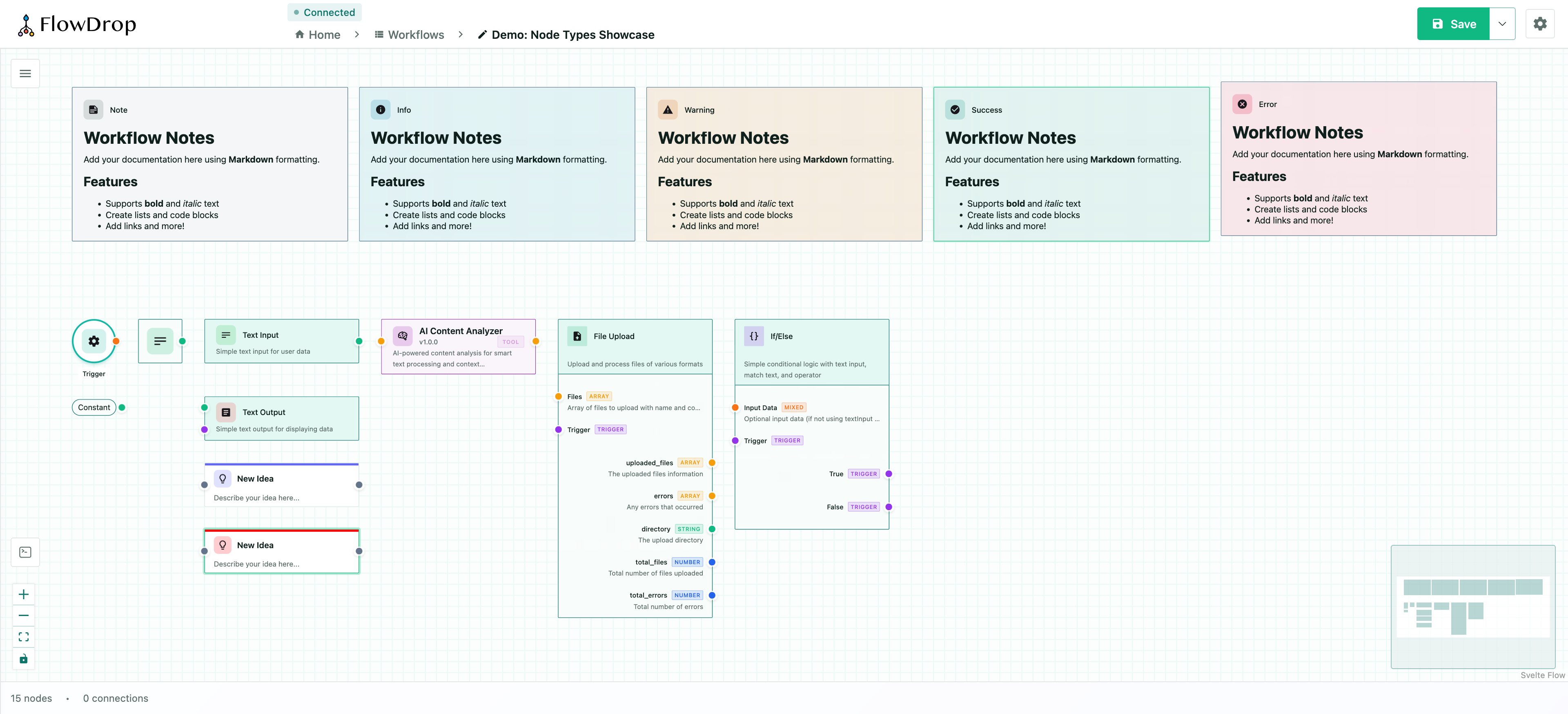
For the complete JSON structure, see Node Structure. For port definitions and data types, see Port System & Data Types.
default
Full-featured node with input/output port lists, icon, label, and description. Suitable for most workflow steps.
simple
Compact layout with header icon and description. Space-efficient for nodes that don't need visible ports.
square
Icon-only minimal design. Ideal for simple operations where the icon alone conveys the purpose.
tool
Designed for AI agent tools. Displays tool metadata including version, badge label, and description.
gateway
Branching logic node with conditional output paths. Supports multiple branches for routing workflow execution.
terminal
Circular start/end point nodes. Used to mark workflow entry and exit points.
idea
Conceptual idea node for BPMN-like flow diagrams. Lightweight node with a colored top border accent.
note
Markdown-enabled sticky notes for documentation. These are non-executing nodes meant for annotations.
atom
A minimalist, label-only node that renders as a compact pill hugging its content — designed for "supplies a value" nodes such as a Constant (and Cast in the future). The atom owns no domain semantics of its own; what it shows and the data type it emits are driven entirely by configuration, so a single node type can back many small value-providing nodes.
The body text resolves in order:
- The value of the config key named by
valueKey(using the field'soneOftitles when present) - The node's
label - The
placeholder, rendered dimmed
The bound output port's data type can be driven dynamically from config, and a server- or definition-provided color accents the pill border.
Display and behavior are configured through extensions.ui.atom (AtomUIConfig):
| Property | Type | Description |
|---|---|---|
valueKey | string | Config key whose value becomes the node body. Falls back to data.label. |
valueTypeKey | string | Config key holding the selected value's type (a port dataType id). The bound output port adopts this type. |
outputPortId | string | Output port id driven by valueTypeKey. Defaults to the first output port. |
shape | 'pill' | 'rectangle' | Body shape. 'pill' (default) is fully rounded; 'rectangle' is lightly rounded. |
prefix | string | Dimmed affordance rendered before the body (e.g. '→ '). Stays visible while the body ellipsizes; hidden in the empty state. |
placeholder | string | Text shown (dimmed) when the resolved body value is empty or unset. |
maxWidth | number | Max body width in px before the label ellipsizes. |
{
  "type": "atom",
  "extensions": {
    "ui": {
      "atom": {
        "valueKey": "value",
        "valueTypeKey": "valueType",
        "shape": "pill",
        "prefix": "= ",
        "placeholder": "Set a value…",
        "maxWidth": 120
      }
    }
  }
}
Ports are resolved from the node's definition like any other node, so atoms participate in connection validation and proximity connect normally. The pill is a fixed 40px tall; when it has a single port, the handle centers vertically, and multiple ports distribute evenly.
Connection validation
FlowDrop validates connections automatically:
- Type compatibility — only compatible port data types can connect
- Cycle detection — prevents circular dependencies (O(V+E) algorithm)
- Loopback prevention — nodes cannot connect to themselves
Proximity connect
When dragging a node near compatible ports, FlowDrop can auto-connect them. This is configurable via editor settings:
const app = await mountFlowDropApp(container, {
  settings: {
    editor: {
      proximityConnect: true,
      proximityConnectDistance: 50 // pixels
    }
  }
});
Dynamic ports
Nodes can define user-configurable ports through special config properties:
{
  "dynamicInputs": {
    "type": "array",
    "title": "Input Ports",
    "items": {
      "type": "object",
      "properties": {
        "id": { "type": "string", "title": "Port ID" },
        "name": { "type": "string", "title": "Port Name" },
        "dataType": { "type": "string", "title": "Data Type", "default": "any" }
      }
    }
  }
}
Custom node types
Beyond the built-in types, you can register custom Svelte components as node types. See the Custom Nodes guide for details.