Template variables
Use dynamic variables from upstream nodes in template editor fields.
Template variables let users reference data from upstream nodes using {{ variable }} syntax. When a config field uses format: "template", FlowDrop provides autocomplete for available variables.
How it works
- A node has a config field with
format: "template" - FlowDrop analyzes the upstream nodes connected to the current node
- The schema in force for each upstream output port becomes available as template variables
- Users type
{{and get autocomplete suggestions
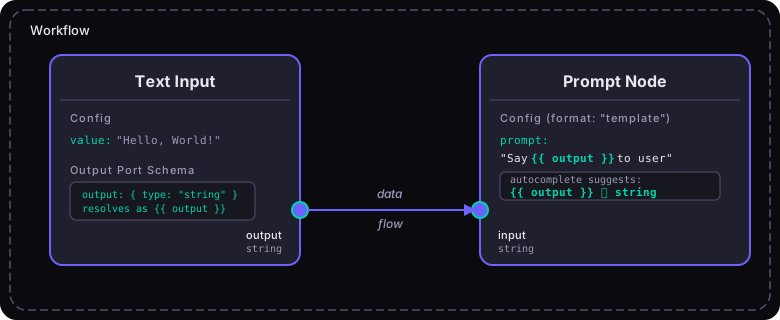
Upstream output ports define the variables.
What an upstream output port carries determines which variables are available. Downstream nodes with format: "template" fields get autocomplete for those variables.
Where a port's fields come from
A port offers its fields from one of two places, and the more specific one wins:
- The port's own
schema, when it declares one. - Otherwise its
dataType's schema — declared once on the data type and shared by every port carrying it. See Data type schemas.
Those fields become the variables. By default they arrive at the top level, so an
error output with a four-field schema offers {{ message }}, {{ code }},
{{ node_id }} and {{ retryable }}. Set includePortName to keep them under
the port instead, and drill in with a dot: {{ error.message }}.
A port whose data type declares no schema still resolves as a variable; it just
has no fields to drill into. A plain string output offers itself and stops
there.
Configuring template fields
In your node's configSchema, use format: "template" with a variables configuration:
{
  "type": "object",
  "properties": {
    "prompt": {
      "type": "string",
      "title": "Prompt Template",
      "format": "template",
      "variables": {
        "ports": ["prompt_input"],
        "showHints": true
      }
    }
  }
}
Variable sources
The variables config supports three sources:
1. Port-derived variables
Automatically derive variables from upstream node connections:
{
  "variables": {
    "ports": ["input"],
    "includePortName": true,
    "showHints": true
  }
}ports— which input port IDs to derive variables fromincludePortName— prefix variables with the port name (default: false)showHints— show clickable variable hints below the editor (default: true)
2. Static schema
Define variables explicitly:
{
  "variables": {
    "schema": {
      "variables": {
        "user": {
          "name": "user",
          "type": "object",
          "properties": {
            "name": { "name": "name", "type": "string" },
            "email": { "name": "email", "type": "string" }
          }
        },
        "timestamp": {
          "name": "timestamp",
          "type": "string"
        }
      }
    }
  }
}
3. API-fetched variables
Fetch variables from an API endpoint at runtime:
{
  "variables": {
    "api": {
      "endpoint": {
        "url": "/api/flowdrop/nodes/{nodeId}/variables?workflowId={workflowId}",
        "method": "GET"
      },
      "cacheTtl": 300000,
      "mergeWithSchema": true,
      "fallbackOnError": true
    }
  }
}
The URL supports {workflowId} and {nodeId} placeholders that resolve at runtime.
Template syntax
FlowDrop's template editor supports Jinja-like syntax:
Variable access
{{ variable_name }}           Simple variable
{{ user.name }}               Object property (dot notation)
{{ items[0].title }}          Array index access
{{ items[*].title }}          All items wildcard
Supported syntax
{{ ... }}    Variable interpolation
{% ... %}    Block statements
{# ... #}    Comments
Autocomplete behavior
The template editor provides intelligent autocomplete:
{{triggers top-level variable suggestions.after a variable triggers property drill-down[after an array variable triggers index suggestions ([0],[1],[*])- Type icons show the variable type:
𝑆string,#number,☑boolean,[]array,{}object
Port schemas for variable resolution
For port-derived variables to work, upstream nodes need output ports with schema:
{
  "id": "data_processor",
  "outputs": [
    {
      "id": "result",
      "name": "Result",
      "type": "output",
      "dataType": "json",
      "schema": {
        "type": "object",
        "properties": {
          "summary": { "type": "string" },
          "score": { "type": "number" },
          "tags": {
            "type": "array",
            "items": { "type": "string" }
          }
        }
      }
    }
  ]
}
This makes {{ result.summary }}, {{ result.score }}, and {{ result.tags[0] }} available as template variables in downstream nodes.
Registering the template editor
The template editor requires CodeMirror. Register it before mounting:
import { registerTemplateEditorField } from '@flowdrop/flowdrop/form/code';
registerTemplateEditorField();
Without registration, template fields fall back to plain text inputs.
Variable schema merging
When multiple sources are configured (ports + schema + API), they merge with this precedence:
- API variables (highest priority)
- Static schema variables
- Port-derived variables (lowest priority)
Configure merging behavior:
{
  "variables": {
    "ports": ["input"],
    "schema": { "variables": { "env": { "name": "env", "type": "string" } } },
    "api": {
      "endpoint": { "url": "/api/variables/{nodeId}" },
      "mergeWithSchema": true,
      "mergeWithPorts": true
    }
  }
}