
The Console: a command line for your canvas
Press one key and the FlowDrop editor gives you a command line. Here's what it does, why one typed line beats hundreds of lines of JSON and a dozen mouse moves, and why it helps AI build workflows that actually work.
Press the backtick key (`) in the FlowDrop editor, and a panel slides up below the canvas. That’s the Console.
You type what you want, and it happens on the canvas. It’s the fastest way to build when you already know what you want. And, as you’ll see, it’s also why AI can build good workflows in FlowDrop.
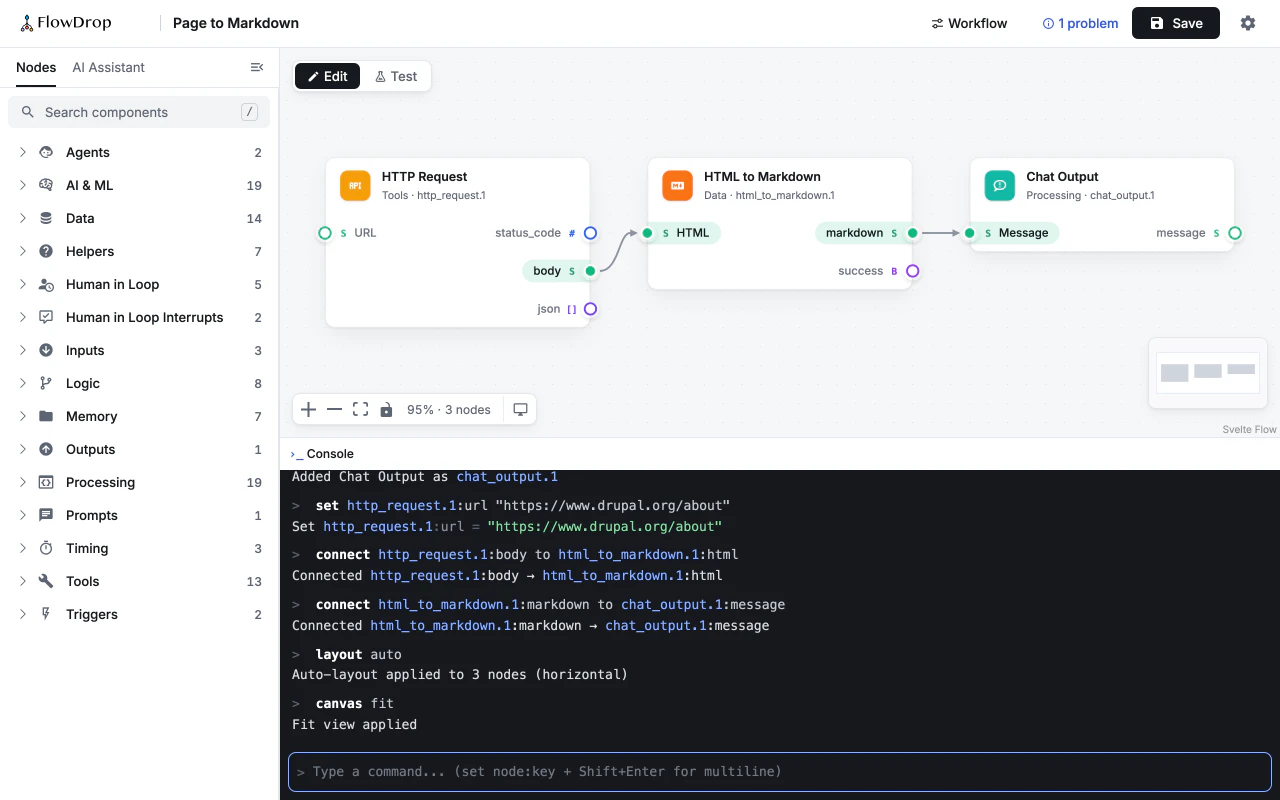
Seven lines, one workflow
Here’s a whole workflow, typed from scratch. It fetches a web page, turns it into Markdown, and shows the result in the chat:
add http_request
add html_to_markdown
add chat_output
set http_request.1:url "https://www.drupal.org/about"
connect http_request.1:body to html_to_markdown.1:html
connect html_to_markdown.1:markdown to chat_output.1:message
layout auto
Each new node gets a short name, like http_request.1, so you can use it on the next line. And you don’t have to remember anything: the Console suggests node names, settings and ports as you type.
Made a mistake? Paste a whole block like this one and it counts as a single step, so one undo takes it all back.
One line instead of 464
add http_request looks almost too simple. So let’s look at what it does for you.
It puts a ready-to-use node on the canvas, with all its ports, all its settings filled in with sensible defaults, a unique name, and a free spot to sit in. Behind the scenes, that node is a big block of JSON. Here’s the real thing, side by side:
> add http_request
Added HTTP Request as http_request.1
{
  "id": "http_request.1",
  "type": "universalNode",
  "position": {
    "x": 100,
    "y": 100
  },
  "deletable": true,
  "data": {
    "label": "HTTP Request",
    "config": {
      "url": "",
      "method": "GET",
      "headers": [],
      "body": "",
      "timeout": 30,
      "follow_redirects": true,
      "allow_internal_requests": false,
      "nodeType": "default",
      "maxRetries": 0,
      "requiresConfirmation": ""
    },
    "metadata": {
      "node_type_id": "http_request",
      "name": "HTTP Request",
      "type": "default",
      "supportedTypes": [
        "default",
        "tool"
      ],
      "description": "HTTP request operations",
      "category": "tools",
      "icon": "mdi:api",
      "plugin_version": "1.0.0",
      "enabled": true,
      "tags": [],
      "executor_plugin": "flowdrop_node_processor:http_request",
      "inputs": [
        {
          "id": "input",
          "name": "Input",
          "type": "input",
          "dataType": "json",
          "required": false,
          "description": "All inputs as JSON object. Available keys: url, method, headers, body, timeout, follow_redirects",
          "exposedByDefault": false
        },
        {
          "id": "url",
          "name": "URL",
          "type": "input",
          "dataType": "string",
          "required": false,
          "description": "The URL to request",
          "defaultValue": ""
        },
        {
          "id": "method",
          "name": "HTTP Method",
          "type": "input",
          "dataType": "string",
          "required": false,
          "description": "The HTTP method to use",
          "defaultValue": "GET",
          "exposedByDefault": false
        },
        {
          "id": "headers",
          "name": "Headers",
          "type": "input",
          "dataType": "json",
          "required": false,
          "description": "HTTP headers to send",
          "defaultValue": [],
          "exposedByDefault": false
        },
        {
          "id": "body",
          "name": "Request Body",
          "type": "input",
          "dataType": "string",
          "required": false,
          "description": "Request body for POST/PUT requests",
          "defaultValue": "",
          "exposedByDefault": false
        },
        {
          "id": "timeout",
          "name": "Timeout",
          "type": "input",
          "dataType": "number",
          "required": false,
          "description": "Request timeout in seconds",
          "defaultValue": 30,
          "exposedByDefault": false
        },
        {
          "id": "follow_redirects",
          "name": "Follow Redirects",
          "type": "input",
          "dataType": "boolean",
          "required": false,
          "description": "Whether to follow HTTP redirects",
          "defaultValue": true,
          "exposedByDefault": false
        },
        {
          "id": "trigger",
          "name": "Trigger",
          "type": "input",
          "dataType": "trigger",
          "required": false,
          "description": "",
          "displayOrder": 100
        },
        {
          "id": "loop_back",
          "name": "Loop Back",
          "type": "input",
          "dataType": "trigger",
          "required": false,
          "description": "Re-entry signal. Wire a downstream output here to run this node again. The value is not delivered as data — only iterator nodes consume it.",
          "exposedByDefault": false,
          "displayOrder": 95
        }
      ],
      "outputs": [
        {
          "id": "output",
          "name": "Output",
          "type": "output",
          "dataType": "json",
          "required": false,
          "description": "All outputs as JSON object. Available keys: status_code, headers, body, json, url, method, request_time",
          "exposedByDefault": false
        },
        {
          "id": "status_code",
          "name": "status_code",
          "type": "output",
          "dataType": "number",
          "required": false,
          "description": "HTTP response status code"
        },
        {
          "id": "headers",
          "name": "headers",
          "type": "output",
          "dataType": "array",
          "required": false,
          "description": "HTTP response headers",
          "exposedByDefault": false
        },
        {
          "id": "body",
          "name": "body",
          "type": "output",
          "dataType": "string",
          "required": false,
          "description": "HTTP response body"
        },
        {
          "id": "json",
          "name": "json",
          "type": "output",
          "dataType": "array",
          "required": false,
          "description": "Parsed JSON response (if applicable)"
        },
        {
          "id": "url",
          "name": "url",
          "type": "output",
          "dataType": "string",
          "required": false,
          "description": "The URL that was requested",
          "exposedByDefault": false
        },
        {
          "id": "method",
          "name": "method",
          "type": "output",
          "dataType": "string",
          "required": false,
          "description": "The HTTP method used",
          "exposedByDefault": false
        },
        {
          "id": "request_time",
          "name": "request_time",
          "type": "output",
          "dataType": "number",
          "required": false,
          "description": "Timestamp when request was made",
          "exposedByDefault": false
        },
        {
          "id": "trigger",
          "name": "Trigger",
          "type": "output",
          "dataType": "trigger",
          "required": false,
          "description": "Emitted when this node completes execution",
          "displayOrder": 100
        },
        {
          "id": "tool",
          "name": "Tool",
          "type": "output",
          "dataType": "tool",
          "required": false,
          "description": "Expose this node as a callable tool",
          "exposedByDefault": false,
          "displayOrder": 110
        },
        {
          "id": "error",
          "name": "Error",
          "type": "output",
          "dataType": "error",
          "required": false,
          "description": "Emitted when this node fails. Wire it to route failures instead of failing the run.",
          "exposedByDefault": false,
          "displayOrder": 120
        }
      ],
      "config": {
        "url": "",
        "method": "GET",
        "headers": [],
        "body": "",
        "timeout": 30,
        "follow_redirects": true,
        "allow_internal_requests": false,
        "nodeType": "default"
      },
      "configSchema": {
        "type": "object",
        "properties": {
          "url": {
            "type": "string",
            "title": "URL",
            "description": "The URL to request",
            "default": ""
          },
          "method": {
            "type": "string",
            "title": "HTTP Method",
            "description": "The HTTP method to use",
            "default": "GET",
            "enum": [
              "GET",
              "POST",
              "PUT",
              "DELETE",
              "PATCH",
              "HEAD",
              "OPTIONS"
            ]
          },
          "headers": {
            "type": "object",
            "format": "json",
            "title": "Headers",
            "description": "HTTP headers to send",
            "default": []
          },
          "body": {
            "type": "string",
            "format": "multiline",
            "title": "Request Body",
            "description": "Request body for POST/PUT requests",
            "default": ""
          },
          "timeout": {
            "type": "integer",
            "title": "Timeout",
            "description": "Request timeout in seconds",
            "default": 30,
            "minimum": 1,
            "maximum": 300
          },
          "follow_redirects": {
            "type": "boolean",
            "title": "Follow Redirects",
            "description": "Whether to follow HTTP redirects",
            "default": true
          },
          "allow_internal_requests": {
            "type": "boolean",
            "title": "Allow Internal Requests",
            "description": "Allow requests to internal/private IP addresses. WARNING: Enabling this may expose internal services to SSRF attacks.",
            "default": false
          },
          "nodeType": {
            "type": "string",
            "title": "Visual Type",
            "description": "Select the visual appearance for this node instance.",
            "enum": [
              "default",
              "tool"
            ],
            "default": "default",
            "x-group": "general"
          },
          "instanceTitle": {
            "type": "string",
            "title": "Title",
            "description": "Override the default node title for this instance.",
            "x-config-order": -2,
            "x-group": "general"
          },
          "instanceDescription": {
            "type": "string",
            "title": "Description",
            "description": "Override the default description for this instance.",
            "format": "multiline",
            "x-config-order": -1,
            "x-group": "general"
          },
          "maxRetries": {
            "type": "integer",
            "title": "Max retries",
            "description": "How many times to retry this node on a transient, retryable failure (0 = no retry). Retries are immediate, with no delay, and only apply to failures the node marks retryable.",
            "minimum": 0,
            "default": 0,
            "x-config-order": 50,
            "x-group": "execution"
          },
          "ports": {
            "type": "object",
            "title": "Ports",
            "description": "Order and exposure of this node's ports. A not-exposed port is hidden on the canvas, cannot be wired, and is not runtime-overridable.",
            "format": "ports",
            "x-config-order": 60,
            "x-group": "ports"
          },
          "requiresConfirmation": {
            "type": [
              "string",
              "boolean"
            ],
            "title": "Operator confirmation",
            "description": "Whether this instance pauses for operator approval before executing. Default follows the node type's policy (side-effecting nodes ask unless configured otherwise).",
            "oneOf": [
              {
                "const": "",
                "title": "Default (node type policy)"
              },
              {
                "const": "require",
                "title": "Require confirmation — pause this instance for operator approval"
              },
              {
                "const": "waive",
                "title": "Waive confirmation — run this trusted instance unattended"
              }
            ],
            "default": "",
            "x-config-order": 55,
            "x-group": "execution"
          }
        },
        "required": []
      },
      "uiSchema": {
        "type": "VerticalLayout",
        "elements": [
          {
            "type": "Control",
            "scope": "#/properties/url"
          },
          {
            "type": "Control",
            "scope": "#/properties/method"
          },
          {
            "type": "Control",
            "scope": "#/properties/headers"
          },
          {
            "type": "Control",
            "scope": "#/properties/body"
          },
          {
            "type": "Control",
            "scope": "#/properties/timeout"
          },
          {
            "type": "Control",
            "scope": "#/properties/follow_redirects"
          },
          {
            "type": "Control",
            "scope": "#/properties/allow_internal_requests"
          },
          {
            "type": "Group",
            "label": "General",
            "collapsible": true,
            "defaultOpen": false,
            "elements": [
              {
                "type": "Control",
                "scope": "#/properties/instanceTitle"
              },
              {
                "type": "Control",
                "scope": "#/properties/instanceDescription"
              },
              {
                "type": "Control",
                "scope": "#/properties/nodeType"
              }
            ],
            "icon": "heroicons:cog-6-tooth"
          },
          {
            "type": "Group",
            "label": "Execution",
            "collapsible": true,
            "defaultOpen": false,
            "elements": [
              {
                "type": "Control",
                "scope": "#/properties/maxRetries"
              },
              {
                "type": "Control",
                "scope": "#/properties/requiresConfirmation"
              }
            ],
            "icon": "heroicons:bolt"
          },
          {
            "type": "Group",
            "label": "Ports",
            "collapsible": true,
            "defaultOpen": false,
            "elements": [
              {
                "type": "Control",
                "scope": "#/properties/ports"
              }
            ],
            "icon": "heroicons:arrows-right-left"
          }
        ]
      },
      "confirmation": {
        "policy": "ask",
        "source": "policy",
        "authorControls": [
          "waive",
          "require"
        ],
        "dynamicControls": []
      },
      "can": {
        "add": true
      }
    }
  }
}Now imagine asking an AI to write that JSON instead. Even a trimmed-down version has to get every detail right: the node type, the settings, a name nobody else uses, the exact port names.
And that’s only half of it. The new JSON also has to go in exactly the right place in your workflow:
{
  "id": "page_to_markdown",
  "nodes": [
    { "id": "html_to_markdown.1", … },
    ← the new node goes here, with a name and a spot nobody uses yet
  ],
  "edges": [
    ← the wire goes here, pointing at ports that really exist
  ],
  "metadata": { … }
}
Meanwhile, everything else in the file has to stay exactly as it was. For just two nodes and one wire, that file is already 878 lines long. One missing bracket or one typo, and your workflow breaks, or quietly loses a connection.
With the Console, nobody has to touch the JSON. You say what you want, and FlowDrop writes it, correctly, every time.
And no clicking around
There’s a second way an AI can build: by using the editor the way you do, with a mouse. AI agents that run in your browser can do this. Here’s what it takes to add two nodes and connect them. Click through the steps:
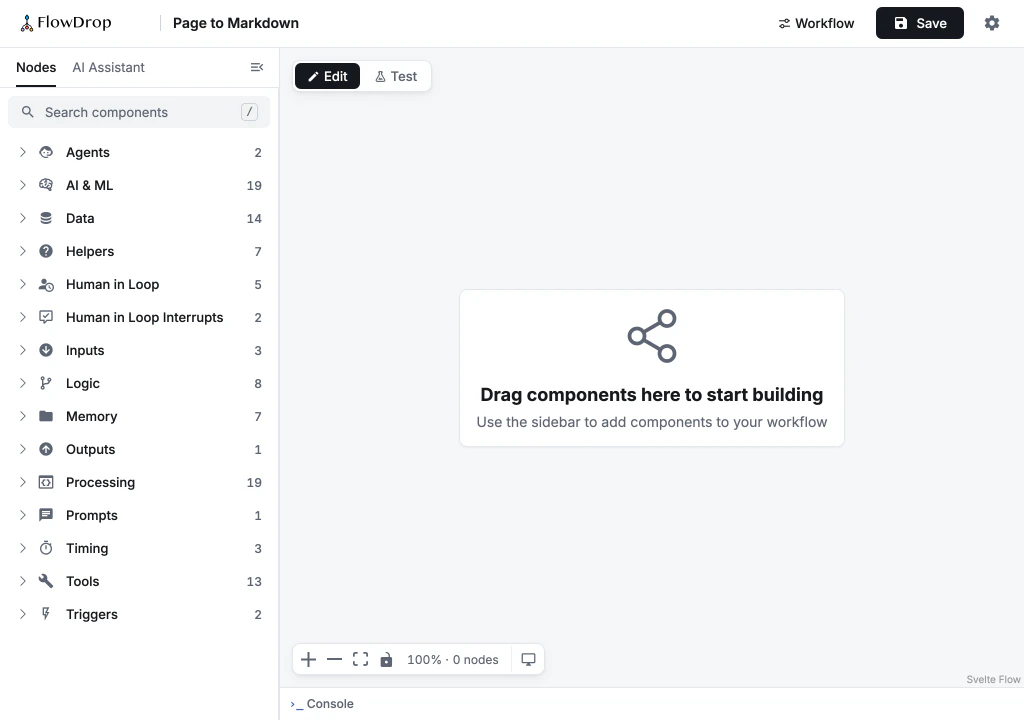
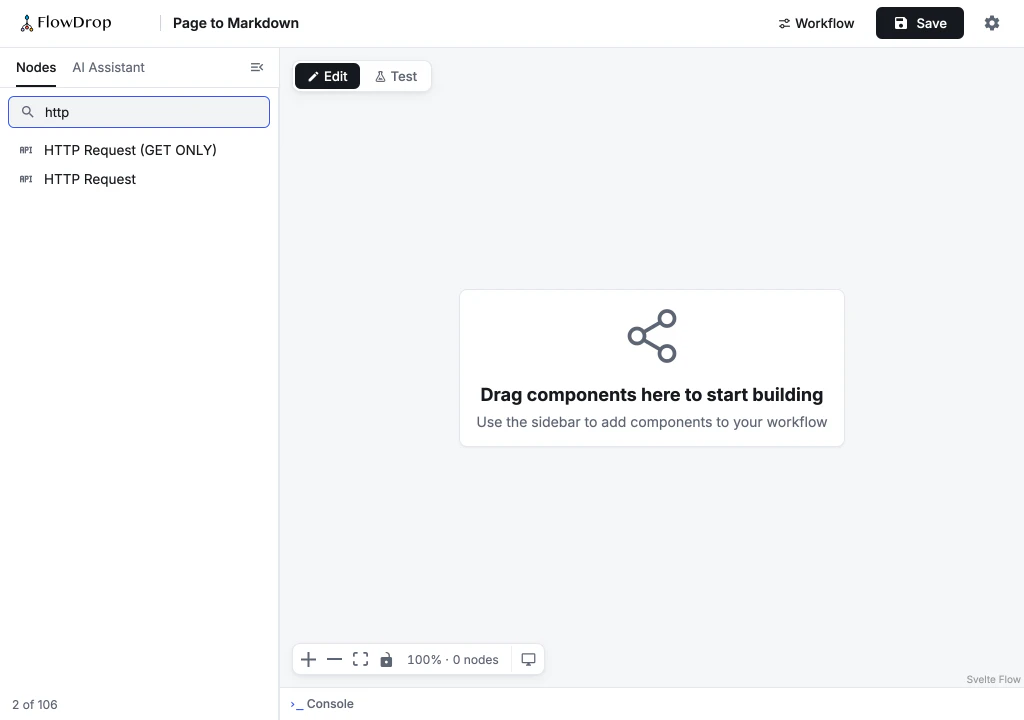
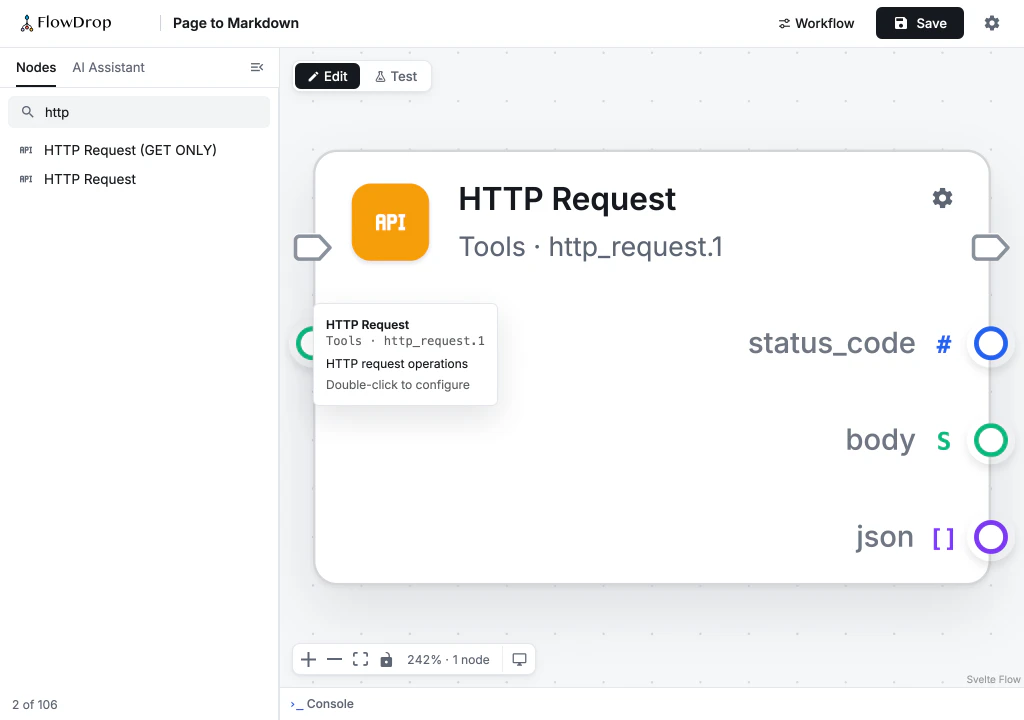
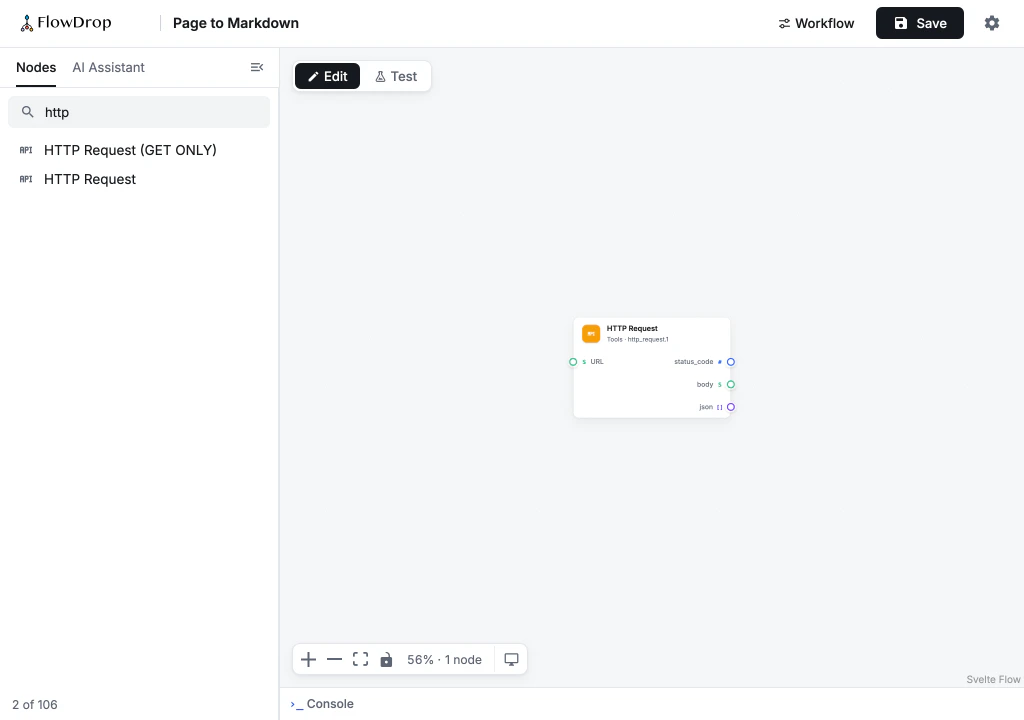
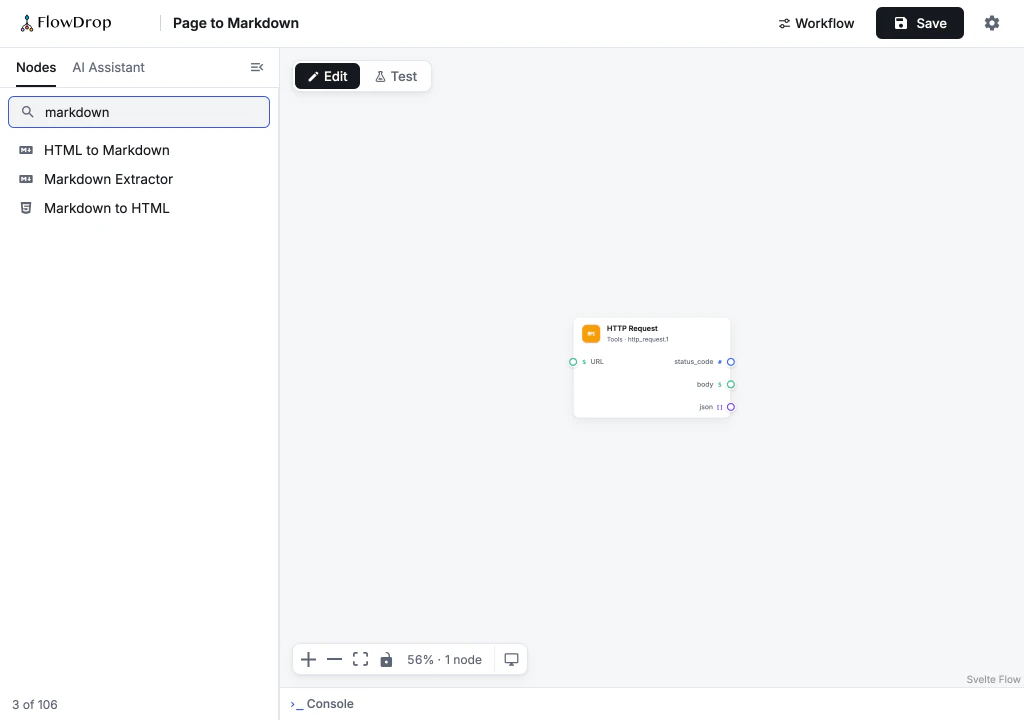
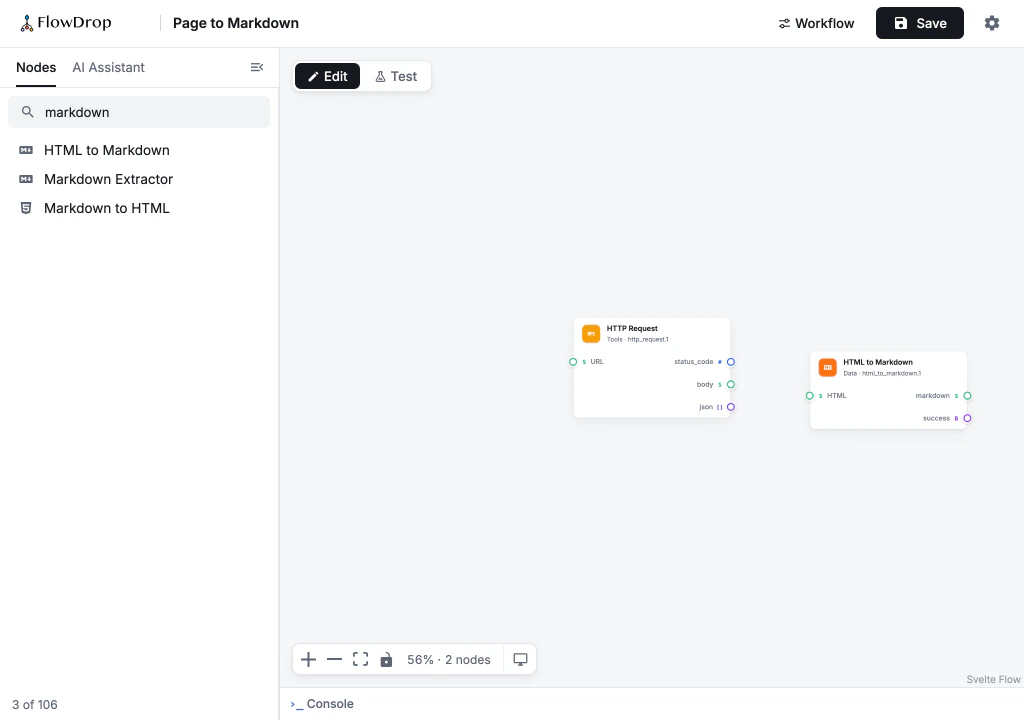
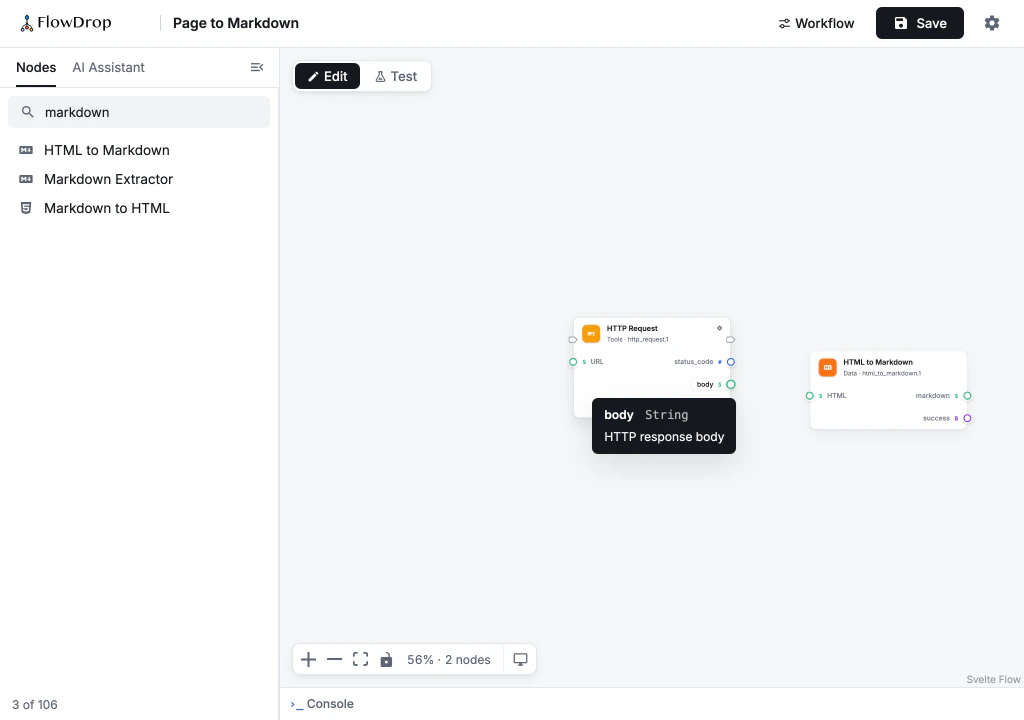
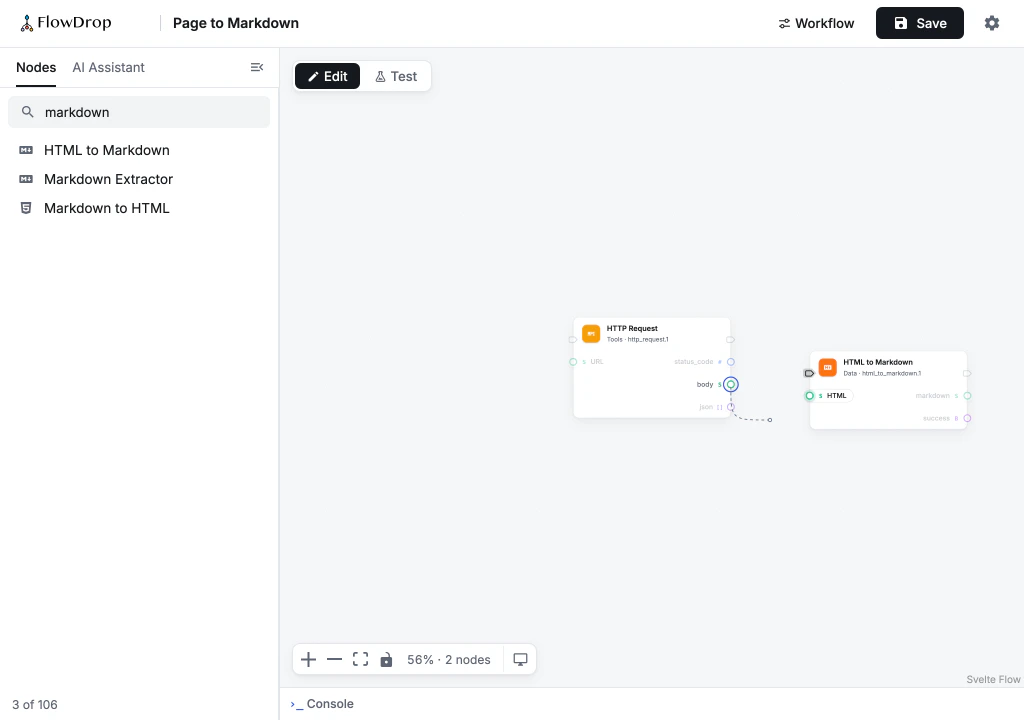
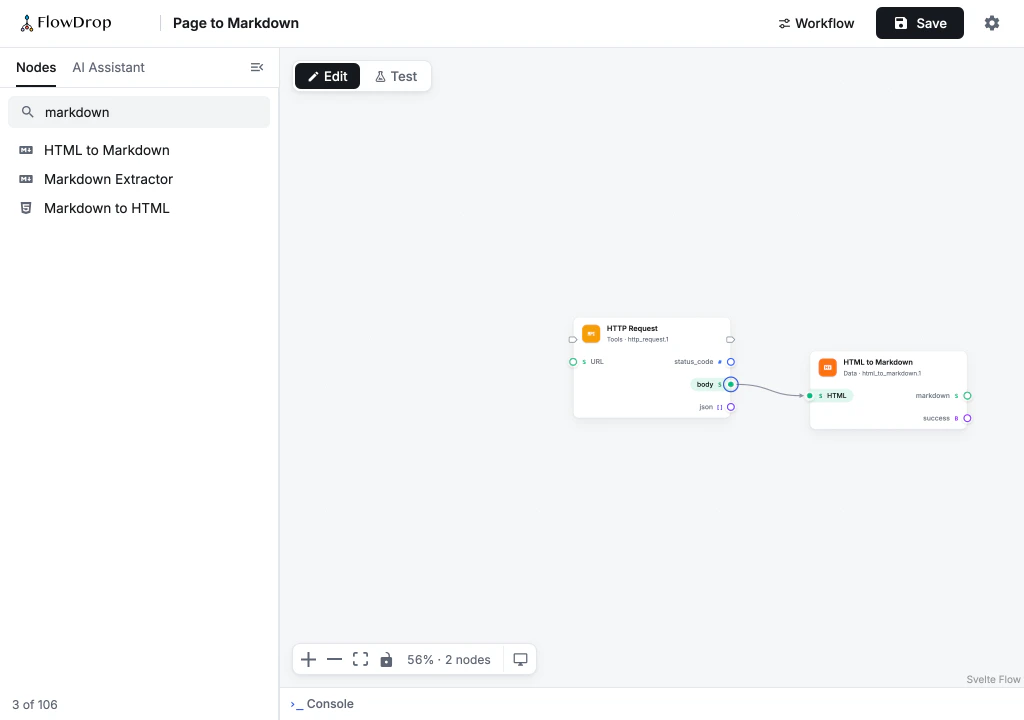
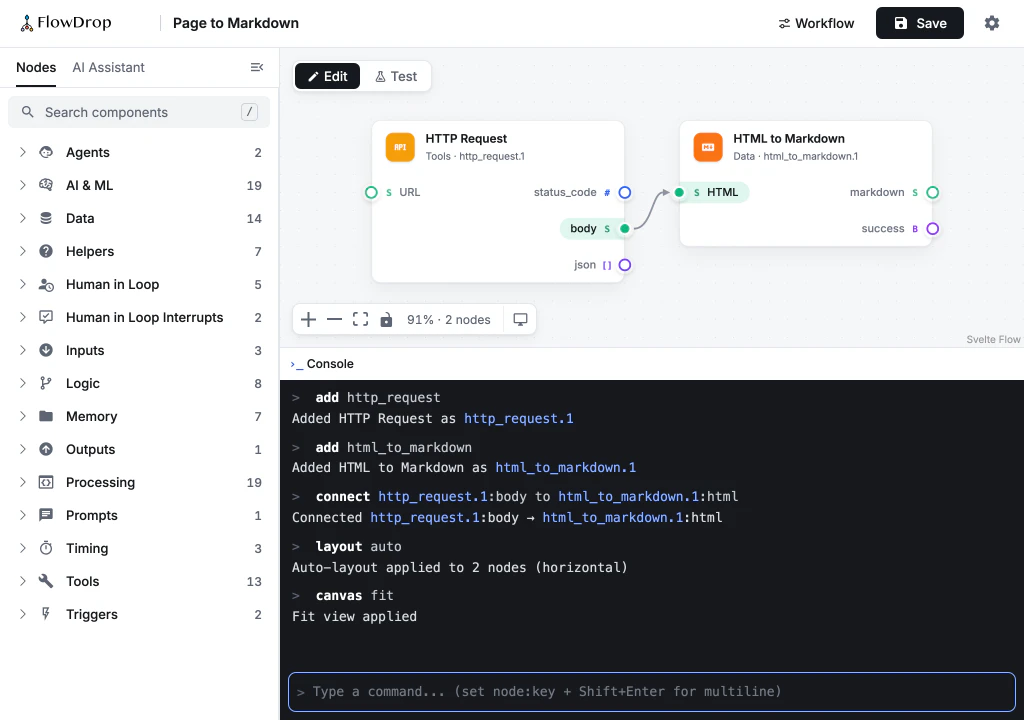
You do those nine steps without thinking. An AI agent can’t. At every step, it has to take a screenshot, work out what it’s looking at, decide what to do, and hope the click or drag lands where it meant. That’s slow, it costs money, and dragging is one of the things these agents find hardest.
With the Console, those nine steps become three lines. That’s the difference between an agent that builds a ten-node workflow in seconds and one that gives up halfway.
Look before you build
AI models have a habit of making things up. Ask one to build a workflow, and it may use a node your site doesn’t have, or a port name that sounds right but doesn’t exist. This is called hallucination, and it’s why so many “AI builds your workflow” demos fall apart on real sites.
The Console fixes this by making it easy to check first. search finds nodes. describe shows everything about a node before you use it: its ports, its settings, and which values each setting accepts.
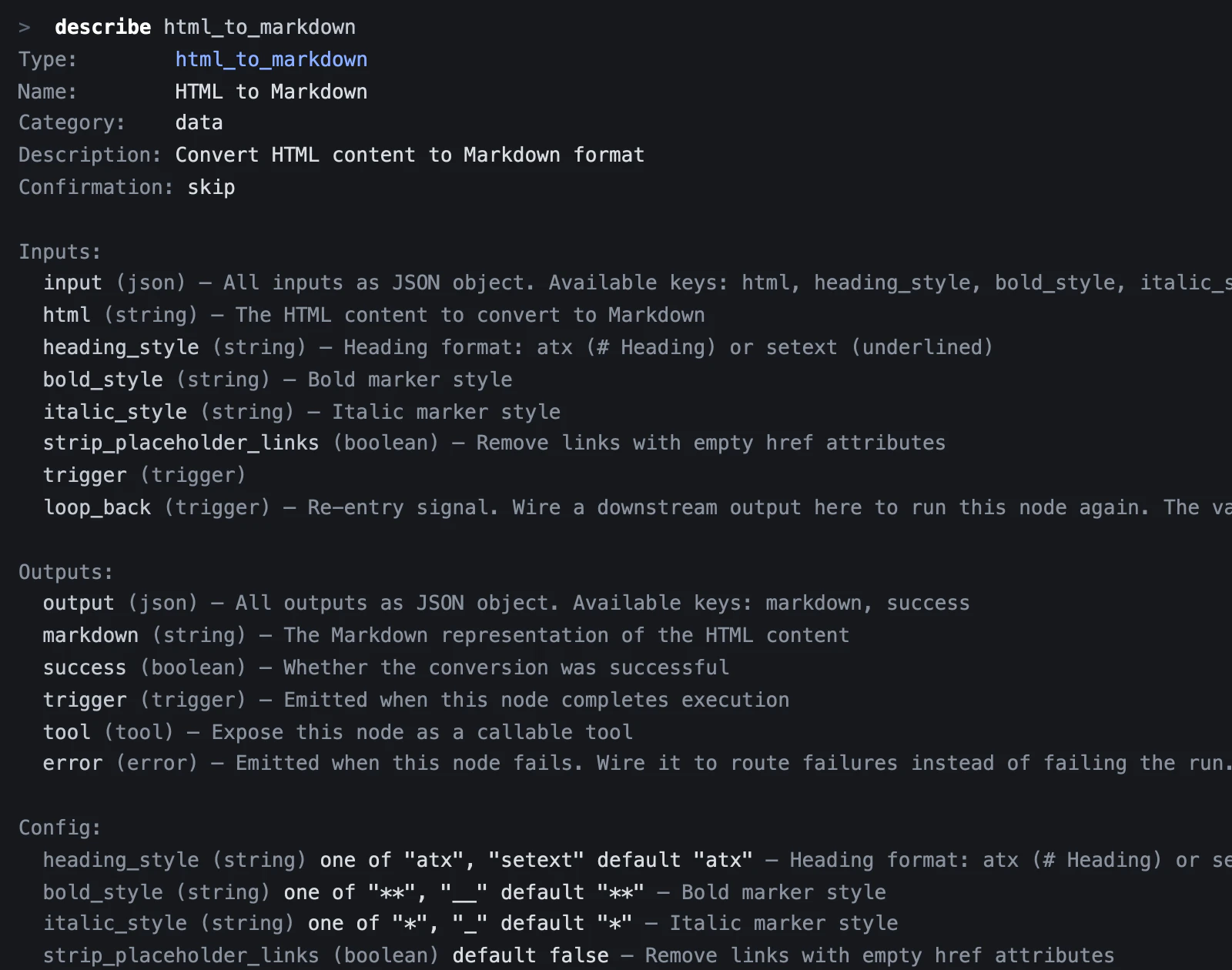
And when something does go wrong, the Console doesn’t just say no. It tells you what would have worked:
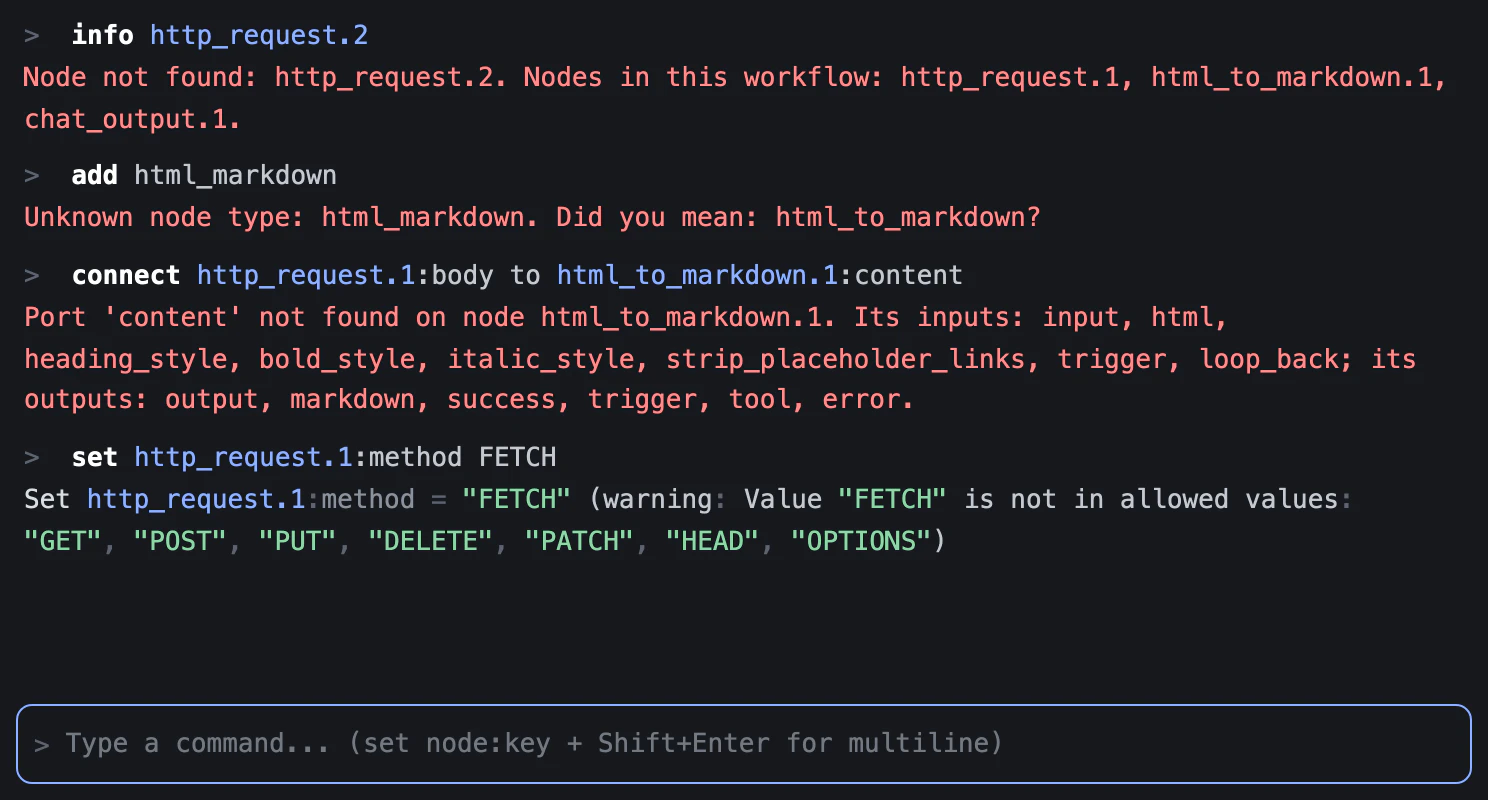
For you, that’s handy. For an AI, it makes all the difference. Instead of guessing again, it reads the answer and gets it right on the next try.
The Console and the AI Assistant
Right next to the Console is the AI Assistant. They sit side by side, but they work in very different ways.
With the Assistant, you chat. You write something like “fetch this page and turn it into Markdown”, and the AI works out which nodes to add.
With the Console, you’re in charge. You type exactly what should happen, and that’s exactly what happens. There’s no AI in between, and no surprises.
So which one should you use? The Assistant is great when you’re exploring, or you’re not sure where to start. The Console is better when you know what you want, or you want to do the same thing again.
Here’s the nice part: when the Assistant builds, it uses the Console’s commands. It looks nodes up before it adds them. And when it makes a mistake, it gets the same helpful answers you saw above. That’s a big part of why it gets things right.
AI tools outside FlowDrop can use the same commands, too. If your browser has an AI assistant built in, or you work with a coding tool like Claude Code or Cursor, FlowDrop can offer them the Console’s commands through a new web standard called WebMCP. Whichever AI is building, it plays by the same rules.
It never does more than you can
If AI can use the Console, what stops it from doing something it shouldn’t? Four things:
- It only works where you’re allowed to work. The Console is part of the workflow editor, and you can only open the editor if you’re allowed to edit that workflow.
- Nothing is saved until you save. And every time a workflow is saved or run, the server checks your permissions. If you can’t save a workflow, no command and no AI can save it for you.
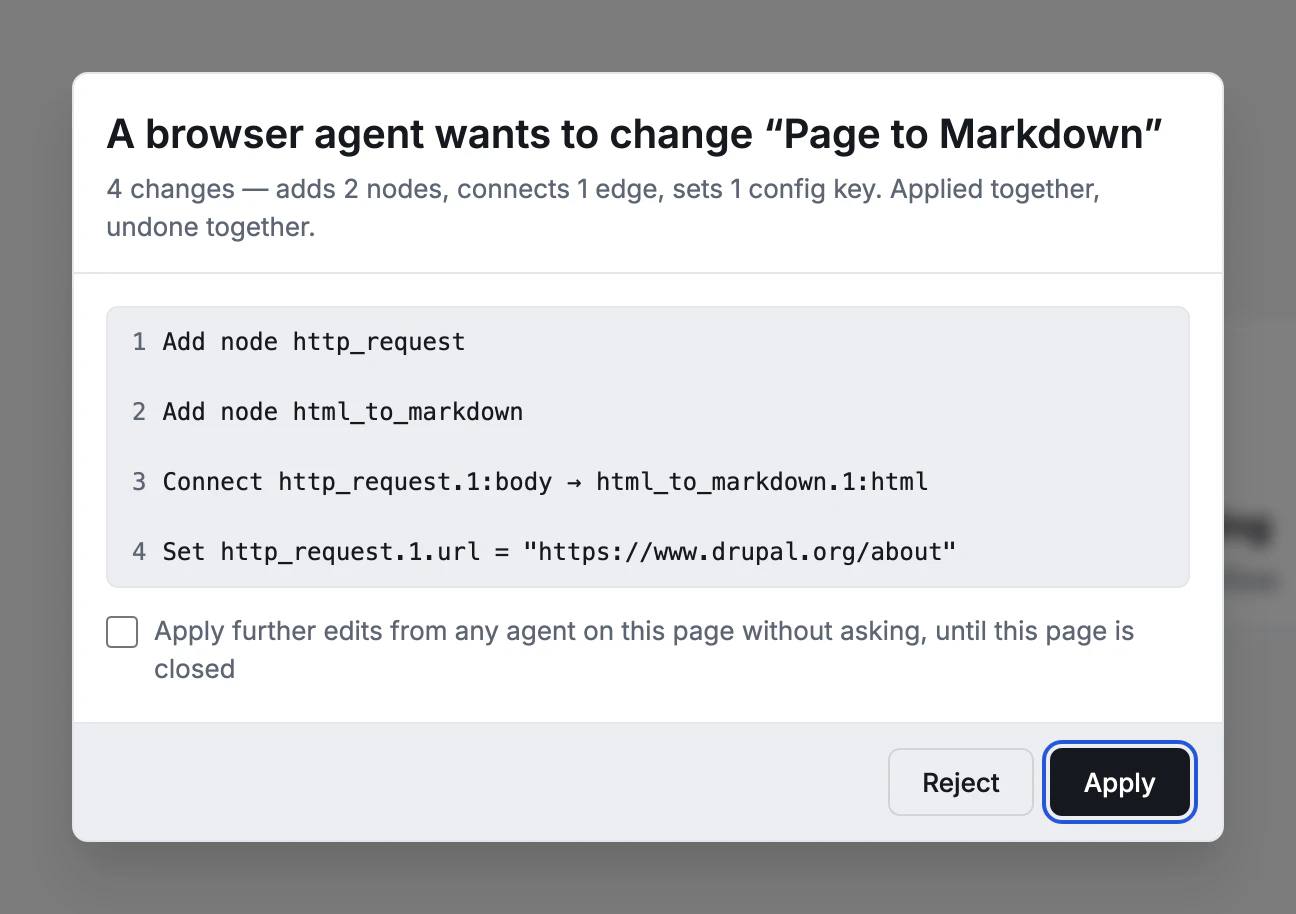
- AI asks before it changes anything. An AI can look around as much as it likes. But before it changes your workflow, the editor shows you exactly what it wants to do and waits for your OK. Saving and running always ask, every time.
- Your site decides. On Drupal, administrators choose which of these tools their editors get: the Console, the AI Assistant, and access for outside AI tools.
Try it
The Console is in FlowDrop today: in the editor on npm, and in FlowDrop for Drupal from version 2.6.
On new Drupal sites it’s switched off at first, since most people who build workflows aren’t developers, and a command line is easy to mistake for a chat. Ask your administrator to turn on Offer the Command Console in FlowDrop’s UI settings. Then:
- Open a workflow and press
`. - Type
helpto see every command. searchfor a node,describeit, andaddit.- Save, then type
session runto try your workflow without leaving the keyboard.
Working with an AI? Tell it the Console is there. You’ll find it builds much more carefully once it can check its own work.
We’d love to hear what you build. For the editor, open an issue on GitHub; for FlowDrop for Drupal, use the drupal.org issue queue.